Best Ultrawide Monitors in 2026: The No-Nonsense Buyer's Guide
Most "best ultrawide monitor" lists are spec dumps with affiliate links stapled on. This one works differently: six categories, one clear recommendation each, and the reasoning behind it — so that when this year's refresh of a panel replaces last year's, you'll still know exactly what to look for. Panel type, resolution, and refresh rate age slowly; model numbers churn every spring.
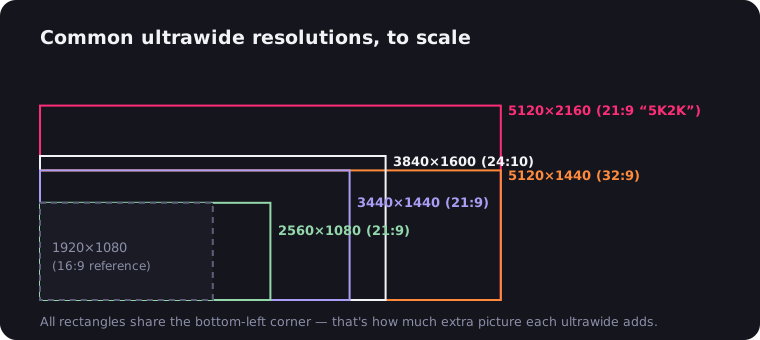
Quick orientation if you're new to the shape: ultrawides are 21:9 (mostly 3440×1440), super ultrawides are 32:9 (5120×1440). We've got a full breakdown of what 21:9 actually means and a tour of every common ultrawide resolution if you want the fundamentals first.
The six picks at a glance
| Category | What to buy | Resolution |
|---|---|---|
| Best overall | 34" QD-OLED (Alienware AW3423DWF class, Samsung Odyssey OLED G8) | 3440×1440 |
| Best value 34" | LG 34WP65C class, Gigabyte G34WQC / M34WQ | 3440×1440 |
| Best for productivity | LG 40WP95C class (5K2K) | 5120×2160 |
| The sweet spot | 38" (LG 38GN950 class, Dell U3821DW) | 3840×1600 |
| Best super ultrawide | 49" Samsung Odyssey G9 line | 5120×1440 |
| Best budget | 29" LG UltraWide (29WP60G class) | 2560×1080 |
Best overall: the 34-inch QD-OLED
If budget allows one splurge, this is it. A 34-inch QD-OLED at 3440×1440 with a 165–175 Hz refresh rate is the point where the ultrawide format stops making compromises: per-pixel lighting means true blacks and effectively infinite contrast, response times are near-instant, and HDR highlights actually glow instead of politely brightening.
The Alienware AW3423DWF defined this category, and Samsung's Odyssey OLED G8 line uses the same QD-OLED panel family — pick whichever suits your taste in stands and warranties. Speaking of warranties: burn-in is the OLED tax. It's far less scary than forum lore suggests, but favor models whose warranty explicitly covers it, and let the panel run its pixel-refresh cycles. Our OLED ultrawide deep dive covers the trade-offs honestly.
Two smaller caveats worth knowing before you fall in love. QD-OLED's subpixel layout can produce faint color fringing on small text — a non-issue for games and films, occasionally noticeable if you stare at code for eight hours a day. And peak full-screen brightness trails a good mini-LED panel, so a sun-drenched office blunts the HDR magic. For a darker room and mixed gaming-plus-media use, though, nothing else comes close.
Movies deserve a special mention here. OLED blacks mean letterbox bars vanish into the bezel — and a 3440×1440 panel is nearly the exact shape of a scope film, so Netflix filled edge to edge on this thing is genuinely cinema-grade.
Look for: QD-OLED or WOLED panel, 3440×1440, 165 Hz+, burn-in warranty coverage.
Best value 34-inch: curved VA or flat IPS
The smart-money pick. A 34-inch 3440×1440 panel at 100–160 Hz delivers about 80% of the flagship experience, typically for well under half the price. LG's 34WP65C class — curved VA, 160 Hz, HDR10 — has been the default recommendation for years for good reason, and LG's broader UltraWide lineup (we've covered it) is the deepest in the business.
Gigabyte is the other value monster: the G34WQC (curved VA, high refresh) undercuts almost everyone, and the M34WQ (flat IPS with a built-in KVM switch) is the better pick if you drive a work laptop and a desktop from one desk. VA gives you deeper contrast and a curve; IPS gives you truer colors and wider angles. Neither choice is wrong at this price.
Look for: 3440×1440, 100 Hz minimum (144+ if you game), VA for contrast or IPS for color work.
Best for productivity: 5K2K, the spreadsheet monster
5120×2160 — "5K2K" — is a 21:9 canvas with the pixel density of a 4K monitor and change. Text renders crisply at sensible scaling, a video editor gets a native 4K preview plus room for panels, and the LG 40WP95C class adds Thunderbolt docking with power delivery, so one cable runs your entire desk from a laptop.
This is the monitor for people who open three documents side by side and can feel the difference between 109 and 140 pixels per inch. It's also the natural endpoint of the 4K ultrawide category and our top pick for MacBook Pro owners, since macOS scaling loves the density. Gamers should look elsewhere — driving 11 million pixels at high frame rates requires heroic GPU spending.
Look for: 5120×2160 IPS, Thunderbolt/USB-C with 90 W+ power delivery, factory color calibration. More on the office angle in our ultrawide-for-work guide.
The 38-inch sweet spot
The best-kept secret in the lineup. At 3840×1600, a 38-inch ultrawide gives you meaningfully more canvas than a 34 — both wider and taller — without the desk-domination and neck workout of a 49. Pixel density lands around 111 ppi, right in the comfortable zone where text is sharp without scaling headaches.
LG's 38GN950 class made this size famous among gamers (Nano IPS, 144 Hz+), while the Dell U3821DW is the productivity twin — USB-C hub, KVM, and the restrained styling Dell's UltraSharp line is known for (our Dell ultrawide overview has the family tree). The only catch is price: 38-inch panels are produced in smaller volumes and cost disproportionately more than 34s. You're paying for the Goldilocks fit.
Look for: 3840×1600 IPS, 144 Hz if you game, USB-C/KVM if you dock.
Best 49-inch super ultrawide: the dual-monitor killer
A 49-inch 32:9 panel at 5120×1440 is literally two 27-inch QHD monitors fused with no bezel — which is why it's the definitive answer to the ultrawide vs dual monitor debate for people who refuse to compromise. Samsung's Odyssey G9 line owns this category: the aggressive 1000R curve sounds gimmicky until you sit centered in it, at which point flat screens start feeling wrong. The Odyssey OLED G9 variant adds per-pixel lighting to the same footprint.
Be honest with yourself about logistics: measure your desk (you want 70+ cm of depth), check your GPU (5120×1440 is 1.6× the pixels of 3440×1440), and check your software — a few games and many video calls handle 32:9 awkwardly. Our 49-inch guide and super ultrawide overview cover the lifestyle adjustment in detail.
Look for: 5120×1440 (not the older 3840×1080), 120 Hz+, VA or OLED, deep desk.
Best budget: the 29-inch gateway drug
A 29-inch 2560×1080 IPS ultrawide — LG's 29WP60G class is the archetype — is how most people find out whether 21:9 fits their life, typically for about the price of a boring 24-inch office panel. You get the full widescreen workflow: two comfortable browser windows, a real timeline for light video editing, and movies without letterboxing.
The honest caveats: 1080p vertical resolution feels tight for dense spreadsheets, and pixel density is mediocre at 29 inches (avoid 34-inch panels at this resolution — the pixels get chunky). There's an upside to the modest pixel count, though: any laptop's integrated graphics can drive it, and older GPUs can even game on it comfortably. Treat it as a test drive; plenty of people upgrade to a 34 within a year and move the 29 to a second desk. AOC also plays well in this bracket (our AOC roundup), and our budget ultrawide guide goes deeper on cheap-but-good.
Look for: 2560×1080 IPS, 75 Hz+, 29 inches — not 34 — at this resolution.
The evergreen buying rules
Models rotate yearly; these don't:
- Refresh rate: 144 Hz+ for gaming, and it's cheap now — here's why it matters. For pure office work, 75–100 Hz is fine.
- Panel type: OLED for contrast and speed, IPS for color accuracy, VA for contrast on a budget. There are no bad panel types anymore, only wrong matches.
- Resolution honesty: 3440×1440 is the format's center of gravity for a reason — the resolution landscape explains the trade-offs at each tier.
- Curve radius: the number is the radius in millimeters, so smaller means curvier. 1800R–1900R is gentle and office-safe; 1000R is immersive and polarizing. Flat still makes sense at 34 inches for color-critical work; past 38 inches, you want some curve.
- HDR labels: DisplayHDR 400 is a marketing sticker, not HDR — the panel simply gets a bit brighter. Real HDR starts with OLED or full-array local dimming. Don't pay extra for the sticker.
- Stand and mounting: ultrawides are heavy and wide, so check for height adjustment and a VESA mount. A monitor arm frees a surprising amount of desk under an 80 cm panel.
- Brand ecosystems: beyond LG and Samsung, ASUS (ROG and ProArt) and MSI (aggressive QD-OLED pricing) both field serious contenders in the gaming tiers — see our full gaming ultrawide guide for how they stack up.
- Console plans: consoles don't output 21:9 — check our PS5 ultrawide explainer before buying an ultrawide as a console display.
One last thing before you checkout: whatever panel you pick, most web video will still arrive in a 16:9 box with black bars on either side. That part isn't the monitor's fault, and it takes a minute to fix — the free UltraWide Video extension zooms video to fill the panel on Netflix, YouTube, and everywhere else. Buy the screen for the extra width; make sure your video actually uses it.

Watching on an ultrawide monitor?
UltraWide Video removes black bars from YouTube, Netflix, Prime Video and any other site — zoom or stretch any video to fill your 21:9 or 32:9 screen.