Best Budget Ultrawide Monitors: Expanded View Without Breaking the Bank
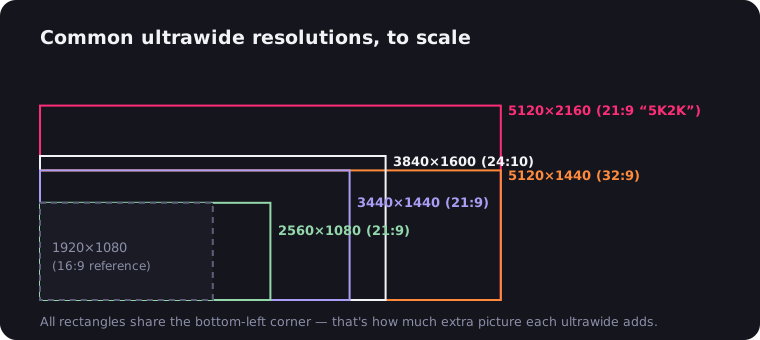
In the ever-evolving world of computer displays, ultrawide monitors have carved out a significant niche. These expansive screens offer an immersive experience for work and play alike, but they often come with a hefty price tag. However, the market has responded to demand, and now there are several excellent budget-friendly options available. In this article, we'll explore the best budget ultrawide monitors that offer great value without compromising too much on quality.
What Makes a Monitor "Ultrawide"?
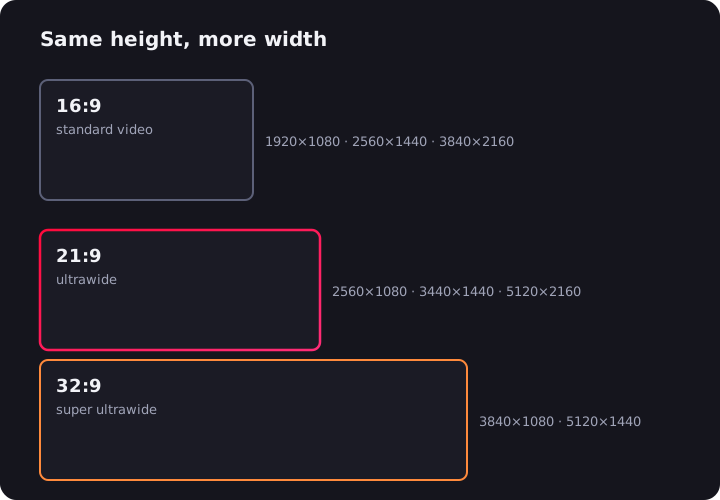
Before diving into our recommendations, let's clarify what we mean by "ultrawide." Traditionally, monitors have an aspect ratio of 16:9. Ultrawide monitors, on the other hand, typically have an aspect ratio of 21:9 or even 32:9. This wider format provides more horizontal screen real estate, which can be particularly beneficial for multitasking, gaming, and video editing.
The Benefits of Ultrawide Monitors
- Increased Productivity: The extra screen space allows for easier side-by-side window arrangements, reducing the need for constant tab switching.
- Immersive Gaming: Many games support ultrawide resolutions, offering a more expansive field of view.
- Enhanced Movie Viewing: Most films are shot in a widescreen format, making ultrawide monitors ideal for cinephiles.
- Reduced Desk Clutter: An ultrawide can replace a dual-monitor setup, freeing up desk space.

One caveat for movie nights: regular 16:9 video (most of YouTube and plenty of streaming) plays with vertical black bars on a 21:9 screen. That's easy to fix in the browser — the UltraWide Video extension zooms the picture until it fills the display. More on the phenomenon in why movies have black bars.
Top Budget Ultrawide Monitors
Now, let's look at some of the best budget ultrawide monitors currently available on the market:
1. LG 34WN650-W
The LG 34WN650-W is a 34-inch ultrawide monitor that offers excellent value for its price. With an IPS panel, it provides good color accuracy and wide viewing angles. The 2560x1080 resolution, while not the highest available, is sufficient for most users and helps keep the price down.
Key Features:
- 34-inch IPS display
- 2560x1080 resolution
- 75Hz refresh rate
- AMD FreeSync support
- HDR10 compatibility
2. Sceptre C355W-3440UN
Sceptre might not be as well-known as some other brands, but their C355W-3440UN offers impressive specs at a budget-friendly price point. This 35-inch curved monitor provides an immersive experience with its 3440x1440 resolution.
Key Features:
- 35-inch VA panel
- 3440x1440 resolution
- 100Hz refresh rate
- AMD FreeSync support
- 1500R curvature
3. AOC CU34G2X
The AOC CU34G2X is a gaming-focused ultrawide monitor that doesn't break the bank. It offers a high refresh rate and low response time, making it ideal for gamers on a budget.
Key Features:
- 34-inch VA panel
- 3440x1440 resolution
- 144Hz refresh rate
- 1ms MPRT response time
- AMD FreeSync Premium
4. Viotek GNV34DBE
Viotek has made a name for itself by offering feature-rich monitors at competitive prices. The GNV34DBE is no exception, providing a curved ultrawide experience with impressive gaming specs.
Key Features:
- 34-inch VA panel
- 3440x1440 resolution
- 144Hz refresh rate
- AMD FreeSync support
- 1500R curvature
Factors to Consider When Choosing a Budget Ultrawide Monitor
When shopping for a budget ultrawide monitor, keep these factors in mind:
- Resolution: While 2560x1080 is more budget-friendly, 3440x1440 provides a sharper image but typically costs more.
- Panel Type: IPS panels offer better color accuracy and viewing angles, while VA panels generally provide better contrast ratios.
- Refresh Rate: Higher refresh rates (above 60Hz) provide smoother motion, which is particularly important for gaming.
- Size: Most ultrawide monitors are between 29 and 35 inches. Consider your desk space and viewing distance when choosing.
- Ports: Ensure the monitor has the connections you need (HDMI, DisplayPort, USB, etc.).
- Additional Features: Things like adaptive sync (FreeSync or G-Sync), HDR support, and built-in speakers can add value.
Conclusion
Ultrawide monitors offer a unique and immersive computing experience, and thankfully, you no longer need to spend a fortune to enjoy their benefits. The monitors we've discussed here represent some of the best values in the budget ultrawide market, offering a range of features to suit different needs and preferences.
Remember, "budget" is relative, and while these monitors are more affordable than premium ultrawide options, they still represent a significant investment. Take the time to consider your needs, read reviews, and if possible, see the monitors in person before making your decision.
With the right choice, a budget ultrawide monitor can significantly enhance your computing experience, whether you're working, gaming, or enjoying multimedia content. Happy shopping!

Watching on an ultrawide monitor?
UltraWide Video removes black bars from YouTube, Netflix, Prime Video and any other site — zoom or stretch any video to fill your 21:9 or 32:9 screen.