UltraWide Video extension icon

UltraWide Video

21:9 video, no black bars.

Almost everything online is filmed for 16:9 screens. On an ultrawide monitor, that means black bars around every video you watch. UltraWide Video zooms or stretches any video, on any website, so it fills your screen edge to edge.

Add to Chrome — it's free Get it for Edge

Free • 4,000+ users • Works on every website

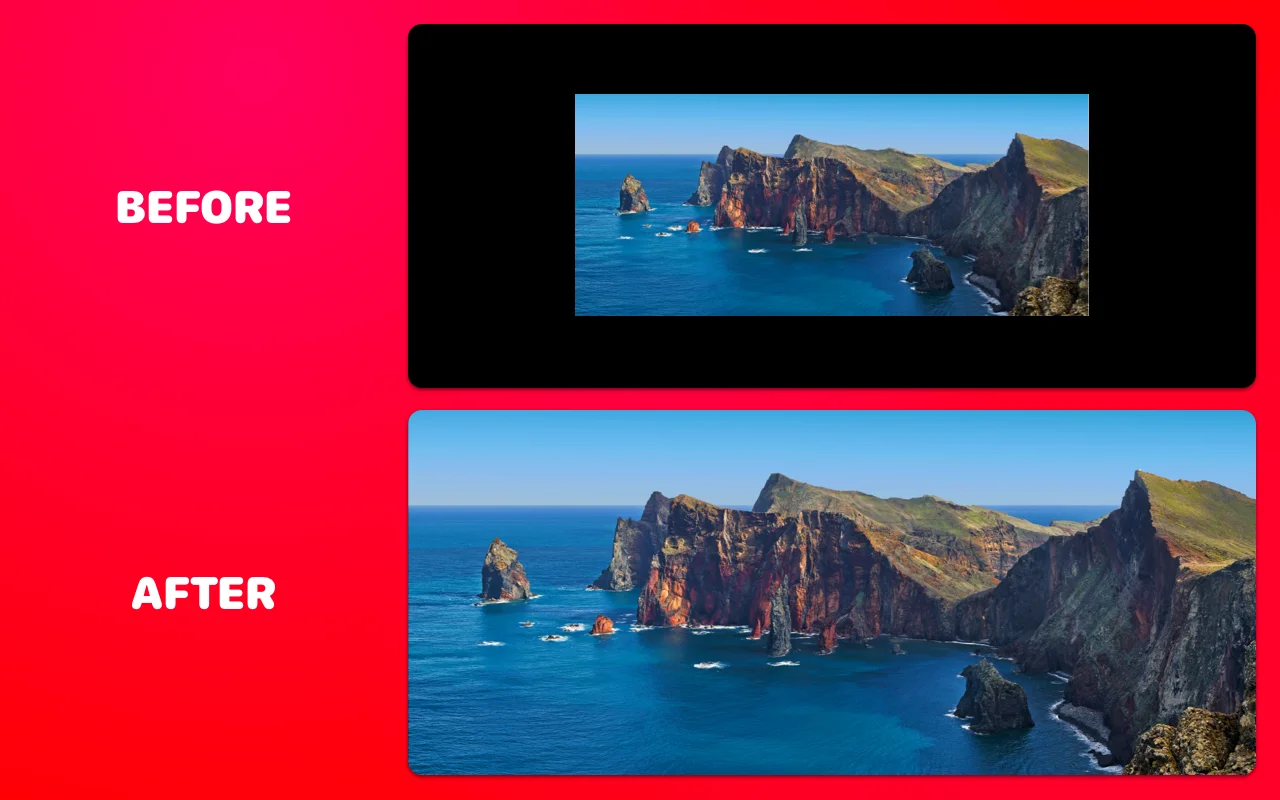
Before and after using UltraWide Video: a 16:9 video with black bars on an ultrawide screen, then the same video filling the whole 21:9 screen

Two ways to fill your screen

Pick the mode that fits what you're watching — then forget the extension is even there.

Zoom

Zoom mode

Scales the video up until it fills the screen, keeping proportions perfect. Ideal for 21:9 movies trapped inside 16:9 uploads — you lose nothing but the bars.

Stretch

Stretch mode

Widens the picture horizontally to fill the screen without cropping a single pixel. Great for gameplay, sports and talking-head videos.

Presets

Aspect-ratio presets

One tap to target 16:9, 18:9, 21:9, 24:9 or 32:9 — plus a fine-grained scale slider from 1× to whatever your super-ultrawide needs.

Shortcuts

Keyboard shortcuts

Switch modes or nudge the zoom with ⌘⇧↑ / ⌘⇧↓ (or Ctrl on Windows) without ever leaving fullscreen.

Fullscreen

Only when it matters

Turn on “Apply only in fullscreen” and pages look completely normal while you browse — the magic happens only when you go fullscreen.

Everywhere

Works on every site

One extension for YouTube, Netflix, Prime Video, Disney+, Twitch, embedded players and everything in between — including videos inside iframes.

Works where you watch

No per-site setup. If it plays video in your browser, UltraWide Video can fill your screen with it.

YouTubeNetflixDisney+Prime VideoTwitchVimeoCrunchyrollHBO Max…and any other website
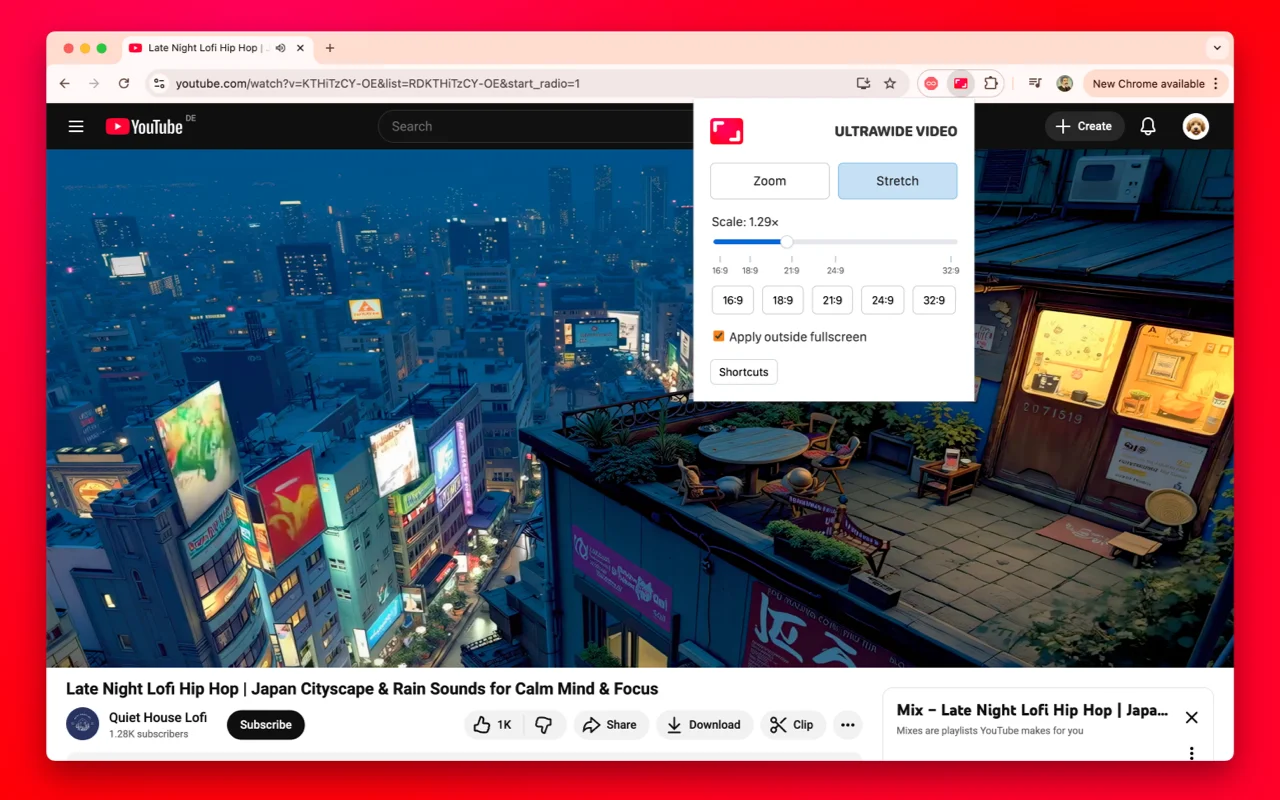
UltraWide Video popup open over a YouTube video, showing Zoom and Stretch modes, a scale slider and aspect-ratio presets from 16:9 to 32:9
The whole extension: pick a mode, set your ratio, done.

Frequently asked questions

Why do videos have black bars on my ultrawide monitor?

Most online video is published in 16:9. An ultrawide screen is 21:9 (or even 32:9), so your browser adds black bars on the sides — pillarboxing — to make the formats match. Cinematic 21:9 films uploaded inside a 16:9 frame even get bars on all four sides. Here's the full story.

How do I remove black bars on YouTube?

Install UltraWide Video, open any YouTube video, click the extension icon and choose Zoom or Stretch. The video instantly fills your screen — step-by-step guide here.

Does it work with Netflix, Disney+ and Prime Video?

Yes. UltraWide Video works on every website that plays video in the browser, including Netflix, Disney+, Prime Video, Twitch, Vimeo and embedded players.

What's the difference between Zoom and Stretch?

Zoom scales the video up proportionally until it fills the width of your screen — nothing distorts, but the parts that overflow are cropped. Stretch widens the image to fit without cropping anything, at the cost of slight horizontal distortion. Try both for two seconds and you'll know which one you prefer.

Is UltraWide Video free?

Yes — completely free on both the Chrome Web Store and Microsoft Edge Add-ons.

Does the extension collect my data?

Your settings live locally in your browser. The extension only gathers anonymized usage analytics that can't be tied to you, and nothing is ever shared or sold — details in the privacy policy.

From the ultrawide blog

Why Do Movies Have Black Bars? (And How to Remove Them)

The black bars on movies are called letterboxing. Here's why they exist, why directors shoot that wide, and when you can safely remove them — and how.

Read →

21:9 Aspect Ratio Explained: Resolutions, Screens and Movies

What 21:9 actually means, common ultrawide resolutions, how it compares to 16:9, and why movies fit it perfectly while web video shows black bars.

Read →

Ultrawide Resolutions: The Complete List (2560×1080 to 5120×2160)

Every ultrawide resolution compared — 2560×1080, 3440×1440, 3840×1600, 5120×1440, 5120×2160 — with pixel counts, PPI and real GPU demand explained.

Read →

All articles →
UltraWide Video icon

Watching on an ultrawide monitor?

UltraWide Video removes black bars from YouTube, Netflix, Prime Video and any other site — zoom or stretch any video to fill your 21:9 or 32:9 screen.

English Deutsch Français Español Italiano Português 日本語 한국어 Русский 中文 Nederlands Polski Svenska Bahasa Indonesia Magyar Čeština Suomi Tiếng Việt ไทย Українська Türkçe