How to Watch Netflix in Ultrawide Without Black Bars
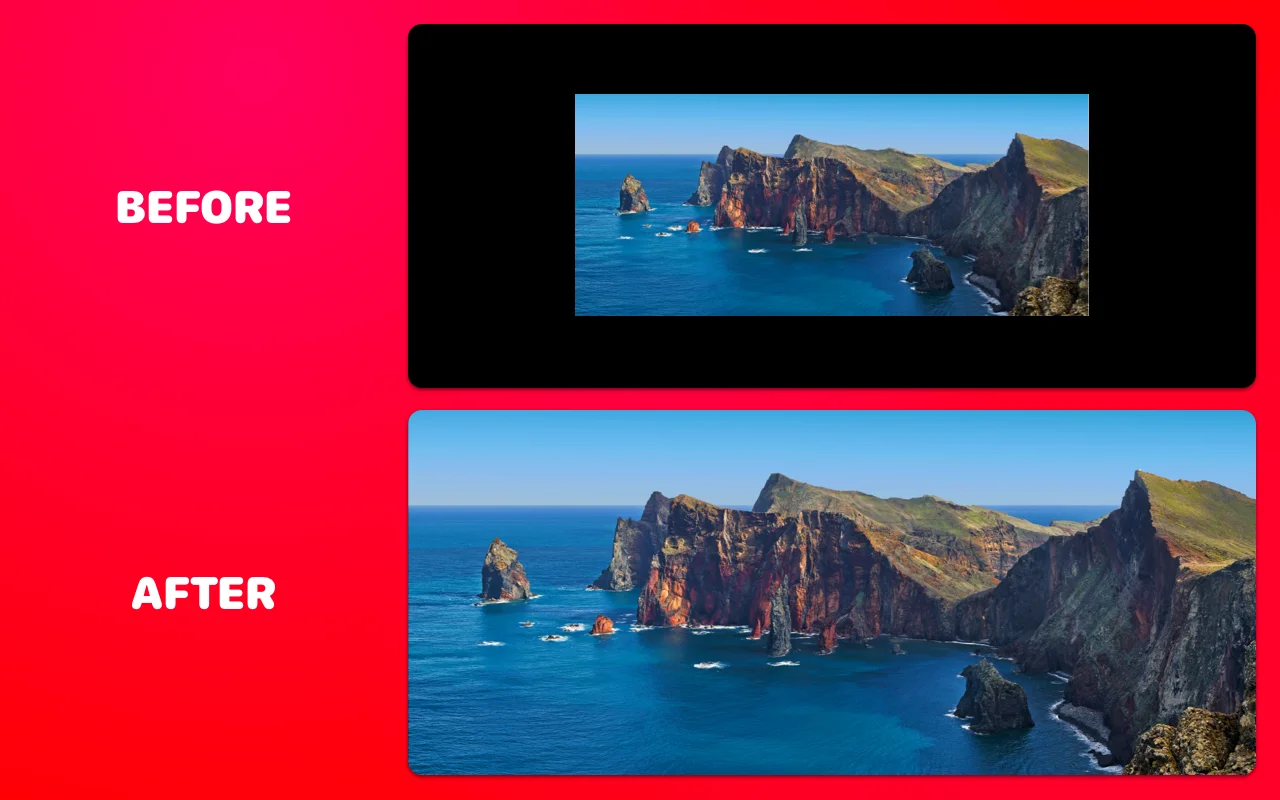
You didn't buy a 21:9 monitor to watch movies in a 16:9 box. Yet that's exactly what Netflix serves up: a smaller rectangle floating between two black columns — and if you're watching an actual widescreen film, black bars on all four sides. The good news: this takes about a minute to fix, and for most movies you lose nothing in the process. Here's why Netflix shows black bars on ultrawide monitors, and how to get rid of them for good.
Why Netflix shows black bars on a 21:9 monitor
Netflix delivers every stream inside a 16:9 frame. Your ultrawide is wider than that — 3440×1440 works out to roughly 2.39:1, noticeably wider than 16:9's 1.78:1. So the browser fits the video by height: on a 3440×1440 screen you get a 2560×1440 picture with a black column about 440 pixels wide on each side. That's the pillarbox.
But there's a second layer, and it's the one that makes Netflix especially annoying. Most films aren't 16:9 either. They're shot wider — often 2.39:1 CinemaScope — and Netflix letterboxes them inside the 16:9 frame. Those horizontal bars are encoded into the video file itself. Play one of those films on an ultrawide and you get bars on all four sides. The industry term is windowboxing. The everyday term is "why did I pay for this monitor."
Roughly speaking, Netflix content comes in three shapes:
- TV shows and older titles — true 16:9. Pillarbox bars left and right, nothing baked in.
- Netflix originals — many are shot around 2:1, so thin baked-in bars plus pillarboxing.
- Licensed movies — often 1.85:1 or 2.39:1. The 2.39:1 ones are the full four-sided treatment.
The irony is hard to miss: a 3440×1440 monitor is almost exactly the shape of a CinemaScope film, and you're watching that film at two-thirds size with bars in every direction.
What zooming actually crops
This is the part most people get wrong. Zooming doesn't blindly chop off picture — what it removes depends on the source:
- 2.39:1 films: nothing real is lost. A ~1.34× zoom on a 3440×1440 screen swallows the encoded letterbox bars and the pillarbox at the same time. The film ends up edge to edge, at its native shape, exactly as framed.
- 2:1 originals: filling the screen trims about 16% of the picture height. Directors keep the action away from the extreme edges, so in practice you rarely notice.
- True 16:9 shows: filling costs about a quarter of the height. That's real cropping — use a gentler zoom, switch to Stretch, or just let sitcoms be sitcoms.
Get rid of black bars on Netflix: step by step
- Install UltraWide Video for Chrome or for Edge. It's free.
- Open Netflix and start playing anything with bars.
- Click the extension icon in your toolbar.
- Pick Zoom mode, then either hit the 21:9 preset or drag the scale slider (around 1.29–1.35× is the sweet spot for scope films on a 3440×1440 screen).
- Fine-tune from the keyboard: Ctrl+↑/↓ on Windows, ⌘⇧↑/↓ on Mac. No need to open the popup mid-movie.
- Optional: enable "Apply only in fullscreen" so browsing Netflix stays untouched and the zoom kicks in when the film does.
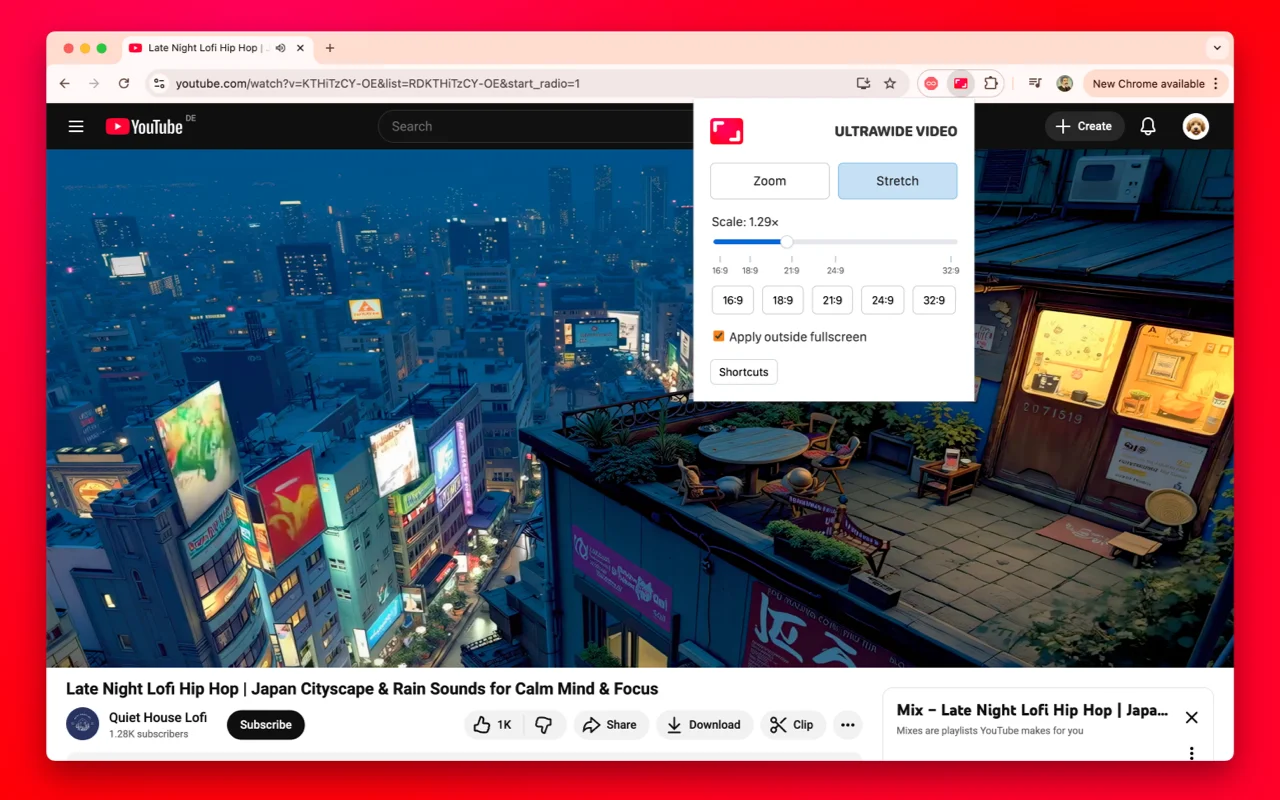
The screenshot shows YouTube, but the popup works identically on Netflix — same modes, same presets, same shortcuts.
Zoom or Stretch?
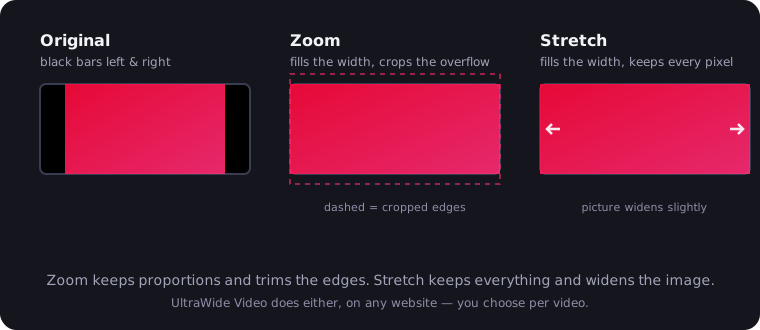
Zoom scales the video proportionally until it fills the screen, cropping whatever overflows. Faces stay the right shape. This is the mode you want for movies, where the "overflow" is mostly black bars anyway.
Stretch widens the picture horizontally without cropping anything. Everyone gets about 12% wider. It sounds like sacrilege, but for 16:9 content where cropping would cut into lower-third graphics or tight framing, a mild stretch is surprisingly watchable. Try both for ten seconds each; your eyes will vote.
Will it look soft?
Short answer: no, and here's the math. A 2.39:1 film inside a 4K stream has an active picture of about 3840×1607 pixels — more than your 3440×1440 panel can even display. Zooming it to full screen still means downscaling. It stays tack sharp.
One Netflix quirk worth knowing: Chrome caps Netflix playback at 1080p, while Edge on Windows can unlock 4K on supported hardware. The extension works the same in both, so if you're chasing maximum sharpness, Edge is the browser to do it in.
And 1080p? The active picture of a scope film upscales about 1.8× to fill the screen. At normal viewing distance it holds up fine — comparable to watching 1080p on a 4K TV, which millions of people do every night without complaint.
Disney+, Prime Video, HBO Max: same problem, same fix
Every major streaming service ships video in the same 16:9 container, so they all pillarbox on an ultrawide and they all letterbox scope films inside the frame. The extension doesn't care whose player it is — it works on any site with a video element, iframes included. Disney+ is a fun case: some of its Marvel titles play in 1.90:1 IMAX ratio, which fills an ultrawide almost perfectly with barely any zoom at all.
Honest limits: what it can and can't do
DRM is not the obstacle people assume. Widevine and PlayReady encrypt the stream to stop copying — they don't control how big the player is drawn on your screen. The extension never touches the video data; it scales the player element at the CSS level, the same way the browser zooms any page. It works fine on every DRM-protected service.
It crops bars, it doesn't invent picture. The bars encoded into the file are what gets removed. If a show was framed in 16:9, no software can conjure the missing 21:9 image — filling the screen means cropping real picture or stretching it. That's physics, not a missing feature.
Watch your subtitles. Netflix sometimes renders subtitles inside the bottom letterbox bar. Zoom past it and the first thing you crop is the dialogue. If that happens, nudge the scale down a notch or two with Ctrl+↓ and you're fine.
That's the whole trick. If you're still deciding on the hardware side, our ultrawide vs dual monitor comparison covers whether one wide panel beats two, and the best ultrawide monitors guide picks the screens worth filling. And if it's YouTube bars that bother you, that fix is here.

Watching on an ultrawide monitor?
UltraWide Video removes black bars from YouTube, Netflix, Prime Video and any other site — zoom or stretch any video to fill your 21:9 or 32:9 screen.