21:9 Aspect Ratio Explained: Resolutions, Screens and Movies
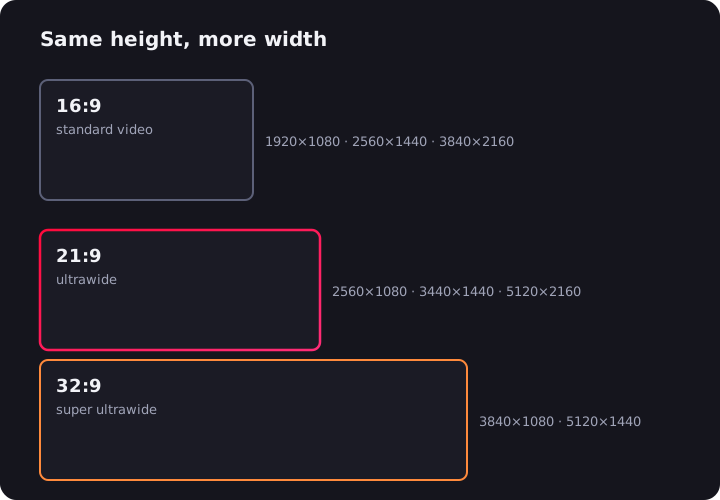
21:9 is the aspect ratio that turns a monitor into an ultrawide. Where a normal 16:9 screen is 1.78 times wider than it is tall, a 21:9 screen stretches to roughly 2.33 times its height — about a third more width for the same height. That extra third is why ultrawides swallow movies whole, why games feel like you're sitting inside them, and why spreadsheet people never go back. Here's what the number actually means, which resolutions use it, and where it comes from (spoiler: the cinema).
What Is the 21:9 Aspect Ratio?
An aspect ratio is just width divided by height. 16:9 works out to 1.78:1. 21:9 works out to about 2.33:1.
Here's the slightly awkward truth: almost no "21:9" panel is exactly 21:9. It's a marketing label. The two ratios actually used in ultrawide monitors are:
- 64:27 (2.37:1) — used by 2560×1080 and 5120×2160 panels. Fun fact: 64:27 is 4:3 cubed, the mathematically elegant successor to old TV ratios.
- 43:18 (2.39:1) — used by 3440×1440 panels, the most popular ultrawide resolution.
Both are a touch wider than a true 21:9, and that's deliberate. They're built to match cinema. Anamorphic widescreen films — "scope" in industry slang — are shot at 2.39:1, a standard that grew out of CinemaScope's 2.35:1 from the 1950s. An ultrawide monitor is essentially a cinema screen that happens to sit on your desk.
Common 21:9 Resolutions
Every 21:9 resolution is a familiar 16:9 resolution with about a third more width bolted on. 2560×1080 is 1080p, wider. 3440×1440 is 1440p, wider. 5120×2160 is 4K, wider.
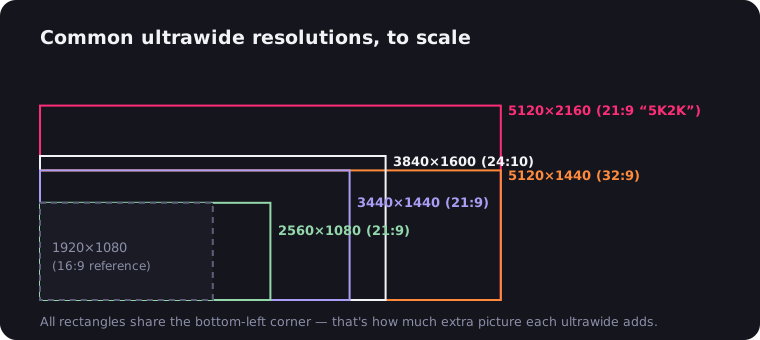
| Resolution | Exact ratio | Also called | Typical size |
|---|---|---|---|
| 2560×1080 | 64:27 (2.37:1) | UW-FHD | 29–34" |
| 3440×1440 | 43:18 (2.39:1) | UW-QHD | 34" |
| 3840×1600 | 12:5 (2.40:1) | UW-QHD+ | 38" |
| 5120×2160 | 64:27 (2.37:1) | 5K2K | 40–45" |
3440×1440 at 34 inches is the default choice for a reason: sharp (~110 PPI), immersive, and a mid-range GPU can drive it. For pixel counts, PPI math and GPU demand for every one of these, see the complete guide to ultrawide resolutions.
Beyond 21:9 sits 32:9 — think 5120×1440 on 49-inch super ultrawide monitors. That's two full 16:9 monitors fused together, minus the bezel down the middle.
16:9 vs 21:9: What Actually Changes
Same height, one-third more width. That's the whole difference — but it changes how the screen feels in practice:
| 16:9 | 21:9 | |
|---|---|---|
| Ratio | 1.78:1 | ~2.37:1 |
| Scope movies (2.39:1) | Thick black bars | Fills the screen |
| YouTube/16:9 video | Fills the screen | Bars left and right |
| Games (Hor+) | Standard view | ~33% wider view |
| Side-by-side windows | Two, cramped | Two comfortably, three at a pinch |
Notice the video rows point in opposite directions. A 16:9 screen letterboxes movies but fits YouTube perfectly; a 21:9 screen fits movies perfectly but pillarboxes YouTube. No single ratio wins everything — 21:9 just picks the cinematic side of the trade. More on fixing the other side below.
For productivity, 21:9 competes directly with running two monitors — one seamless canvas versus two panels with a bezel seam. If that's your dilemma, we've compared ultrawide vs dual monitor setups in detail.
Why Movies Fit 21:9 So Beautifully
Most big films are shot in 2.39:1 scope. On a 16:9 TV, that means fat black bars top and bottom — about 25% of the screen doing nothing. On a 2.37:1 or 2.39:1 ultrawide panel, the mismatch is a rounding error. The picture fills the display edge to edge, the way it fills a cinema screen.
This is the single most underrated ultrawide perk. Dune, Blade Runner 2049, every Bond film since the 60s, most Marvel releases — all scope, all wall-to-wall on 21:9. Directors choose that wide frame on purpose: it holds two actors in one shot, swallows landscapes, and reads as "cinema" at a glance. We dig into the history in why movies have black bars.
Films shot in 1.85:1 (comedies, dramas, most A24 releases) get slim bars on the sides of an ultrawide instead. Nothing's ruined — the image is still huge — it's just not the perfect fit scope gets.
21:9 for Gaming: The FOV Advantage
In games with Hor+ scaling — which is most modern PC titles — a 21:9 screen doesn't stretch the picture, it extends it. You keep the same vertical view and gain roughly 33% more horizontal field of view. You see enemies, apexes and scenery that 16:9 players physically cannot.
It's transformative in sim racing and flight sims (peripheral vision is the point), glorious in open-world games, and genuinely useful in RPGs and strategy titles. One caveat: a few competitive shooters deliberately limit it — Valorant, for instance, refuses to render extra horizontal view so ultrawide players get no edge. Check your main game before buying. Our ultrawide gaming monitor guide covers the panels worth pairing with a good GPU.
21:9 Monitors and TVs
The 21:9 monitor market is thriving — from budget 29-inch panels to 45-inch OLEDs, flat and curved, 60Hz to 240Hz.
The 21:9 TV, on the other hand, is a cautionary tale. Philips sold a Cinema 21:9 TV from 2009 to 2012, and Vizio tried a 58-inch "CinemaWide" — both died quickly. The reason is instructive: TV broadcasts and most streaming shows are 16:9, so a 21:9 television pillarboxed everything people actually watched daily, and the movies that fit it perfectly were the occasional treat. On a desk it's the opposite: you control the content, movies and games lean wide, and the extra width earns its keep every day. Wrong ratio for the living room, right ratio for the desk.
Phones had their own 21:9 moment, too. Sony shipped several Xperia generations with "CinemaWide" 21:9 displays, and most modern phones hover around 19.5:9 to 20:9 anyway. In your hand the logic actually holds up — a tall, narrow slab suits scrolling, and scope films fill it beautifully in landscape. Sony still couldn't sell it, but the ratio itself was never the problem.
Why 21:9 Monitors Are Usually Curved
One practical side effect of all that width: on a flat 34-inch-plus ultrawide, the corners sit noticeably farther from your eyes than the center, so text at the edges goes subtly soft and off-angle. That's why most 21:9 panels ship curved — 1900R to 800R, tighter as screens get wider — bending the edges back toward you so the whole surface sits at a near-constant distance. On a 16:9 monitor, curvature is a gimmick. At 21:9 and especially 32:9, it's ergonomics. It also plays into why the ratio feels so natural: human vision is wider than it is tall, and a gently curved 21:9 panel fills your horizontal field of view without asking your neck to do anything.
Why Web Video Still Shows Black Bars on 21:9
Buy an ultrawide, open YouTube, and you'll meet the irony: black bars on the sides of almost everything. Nearly all web video is uploaded in 16:9, so a 21:9 screen pillarboxes it. Worse, when a 2.39:1 film is packaged inside a 16:9 stream — which is how Netflix and YouTube deliver them — the letterbox bars are baked into the video file itself. Fullscreen that on an ultrawide and you get bars on all four sides, framing a picture that's the exact shape of your screen.
That last case is fixable with zero downsides: the UltraWide Video extension for Chrome and Edge zooms the video until the real picture fills your screen, cropping nothing but bars. Here's the step-by-step for YouTube, and the full story on when bars are removable.
The Bottom Line
21:9 is cinema's aspect ratio, escaped from the theater and installed on a desk. It makes scope films fill the frame, gives games a third more world, and replaces a dual-monitor setup with one clean canvas. Its only real weakness — 16:9 web video floating between black bars — takes one browser extension to fix. As trade-offs go, that's a friendly one.

Watching on an ultrawide monitor?
UltraWide Video removes black bars from YouTube, Netflix, Prime Video and any other site — zoom or stretch any video to fill your 21:9 or 32:9 screen.