Samsung Ultrawide Monitors: Odyssey and Beyond
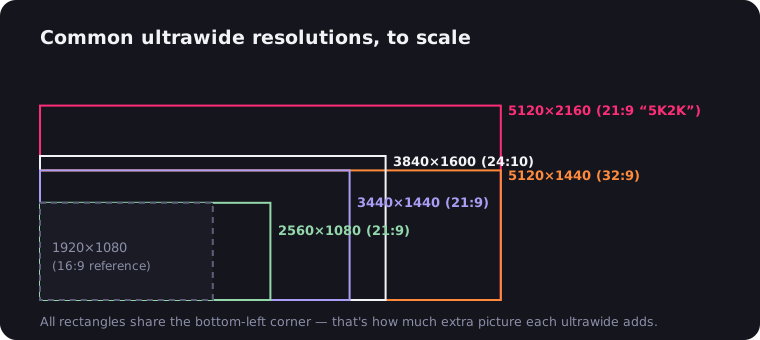
Samsung doesn't really make ultrawide monitors. It makes statements — 49-inch panels curved like satellite dishes, mini-LED backlights with more zones than some TVs, and the occasional sensible 34-incher almost as an apology. If you're shopping for a Samsung ultrawide monitor, the lineup splits cleanly into three families: the Odyssey G9 super ultrawides, the Odyssey OLEDs, and the ViewFinity productivity line. Here's what each one actually is, and who should buy which.
The lineup at a glance
| Model family | Size / ratio | Resolution | Panel | Best for |
|---|---|---|---|---|
| Odyssey G9 / Neo G9 | 49" 32:9 | 5120×1440 | VA / mini-LED VA | Immersive gaming, dual-monitor replacement |
| Odyssey Neo G9 57" | 57" 32:9 | 7680×2160 | Mini-LED VA | The maximalist endgame |
| Odyssey OLED G9 | 49" 32:9 | 5120×1440 | QD-OLED | Gaming + movies with perfect blacks |
| Odyssey OLED G8 | 34" 21:9 | 3440×1440 | QD-OLED | Gaming on a normal-sized desk |
| ViewFinity S65 line | 34" 21:9 | 3440×1440 | VA | Office work, docking, video calls |
Odyssey G9: the monitor that started the arms race
Samsung effectively invented the mainstream super ultrawide category — first with the CHG90 in 2017, then properly with the CRG9's 5120×1440 panel. But the 2020 Odyssey G9 is where it clicked: 49 inches, 5120×1440, 240 Hz, and an aggressive 1000R curve wrapped in that spaceship-white shell. On paper it's two 27-inch QHD monitors fused together with no bezel; in practice it's a genre of its own.
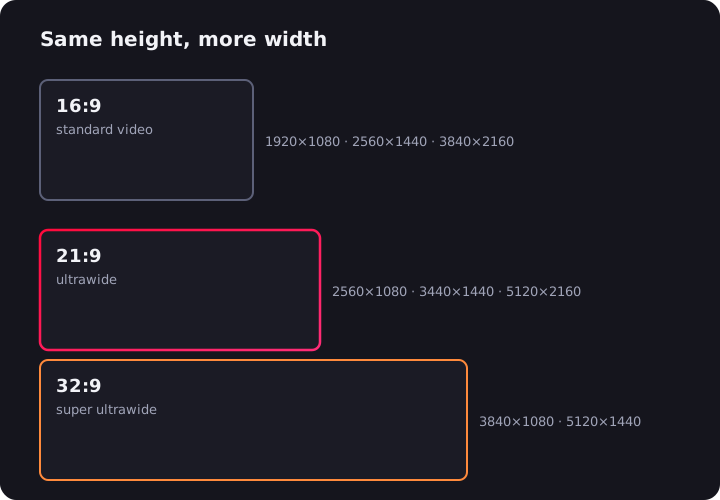
The Neo G9 followed in 2021 and fixed the original's biggest weakness — HDR. Its Quantum Mini LED backlight with over 2,000 local dimming zones turned the G9's "HDR-ish" into genuine highlights-that-sting HDR while keeping VA's deep native contrast. If you want one screen that replaces a dual-monitor setup and swallows your peripheral vision in games, this family is the default answer — our 49-inch monitor guide covers the practicalities.
Then there's the Neo G9 57-inch: 7680×2160, which is literally two 4K monitors side by side, at 240 Hz, with DisplayPort 2.1 required to feed it fully. Nobody needs it. That was never the point.
Odyssey OLED G9: the movie machine
The Odyssey OLED G9 (the G95SC class) takes the 49-inch 5120×1440 format and swaps the backlight for a QD-OLED panel: per-pixel lighting, true blacks, near-instant response, 240 Hz. It also relaxes the curve to 1800R — gentler than the LCD G9's 1000R, which some people prefer for desktop work and some miss in games.
For film lovers this is quietly the most cinematic monitor Samsung makes. A 32:9 panel is wider than any movie format, so films pillarbox — but on OLED the unused areas are genuinely black, not backlit gray. Pair it with our notes on OLED ultrawides for the burn-in housekeeping, which is manageable but real. One quirk to know: recent Odyssey OLEDs ship with Samsung's Smart TV platform built in — apps, a remote, the works. Handy if you want Netflix without a PC, mildly baffling if you just wanted a monitor.
Odyssey OLED G8: the sane one
The 34-inch Odyssey OLED G8 (G85SB class) is Samsung's entry in the most competitive bracket in the ultrawide world: 3440×1440 QD-OLED at 175 Hz. It's the same panel family you'll find in the Alienware AW3423DW and DWF, wrapped in a slimmer, more design-forward chassis — with one famous annoyance: Samsung went with mini-DisplayPort and micro-HDMI connectors, so check your cable drawer before day one.
Picture quality is everything the QD-OLED reputation promises: infinite contrast, gorgeous HDR in dark rooms, motion clarity that makes 175 Hz feel faster than it reads. If your desk can't take a 49-inch panel — most can't; see our setup guide for the desk-depth math — this is the Samsung to short-list against the best 34-inch options from Dell, LG, and MSI.
ViewFinity S65: the one for actual work
Not everyone wants 240 Hz and RGB. The ViewFinity S65 line (S65UA / S65VC class) is a 34-inch 3440×1440 VA panel at 100 Hz with a 1000R curve, built around productivity: USB-C with 90 W power delivery so one cable docks and charges a laptop, a proper hub, KVM-style source switching, and on some variants a built-in pop-up webcam for calls. Refresh rate and response won't excite gamers, and that's fine — it's the Samsung you buy for spreadsheets, code, and eight-hour days, competing with Dell's UltraSharp ultrawides in our office monitor guide.
About that 1000R curve
Samsung leans on curvature harder than any other brand, and 1000R — a one-meter radius, the tightest mainstream curve — is its signature. The pitch: it matches the curvature of human field of view, so the screen edges sit at the same focal distance as the center. In practice, on a 49-inch panel it's transformative; sitting centered in a 1000R G9 is the closest a monitor gets to a cockpit. On a 34-inch panel it's more polarizing — great for immersion, but straight lines bow visibly, which designers and CAD users tend to hate. Notice that Samsung itself chose a gentler 1800R for its OLEDs. If you do precision visual work, try before you buy; if you game, you'll adapt within a week and then find flat screens weirdly flat.
Which Samsung fits you
- Competitive or immersive gamer, big desk: Odyssey Neo G9 49". Speed, HDR punch, and the full wraparound effect.
- Movies and games, dark room: Odyssey OLED G9. Perfect blacks make the 32:9 format sing.
- Normal desk, maximum picture quality: Odyssey OLED G8 34".
- Work first, play sometimes: ViewFinity S65. USB-C docking beats refresh rate from nine to five.
One thing no Samsung spec sheet fixes: web video is still mostly 16:9, so YouTube and Netflix will pillarbox on every monitor above — and on a 32:9 panel the bars are enormous. The free UltraWide Video extension zooms video to fill 21:9 or 32:9 with its aspect presets, which turns that CinemaScope-shaped OLED into an actual cinema. Why the bars exist in the first place is its own story.

Watching on an ultrawide monitor?
UltraWide Video removes black bars from YouTube, Netflix, Prime Video and any other site — zoom or stretch any video to fill your 21:9 or 32:9 screen.