Why Do Movies Have Black Bars? (And How to Remove Them)
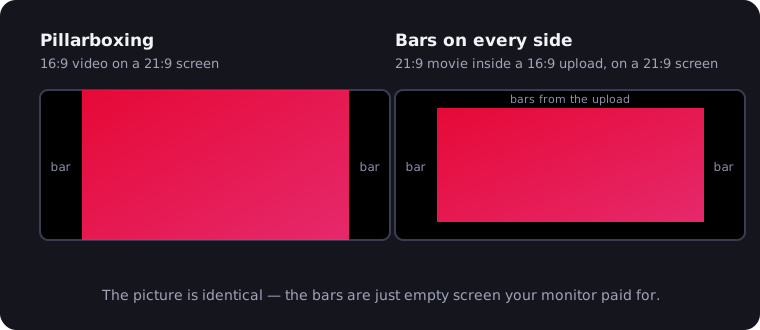
Those black bars above and below a movie are called letterboxing — letterbox bars, if you like — and they exist for one simple reason: the film is wider than your screen. Nothing is broken, nothing is hidden; the bars are just the empty space left over when a wide rectangle is fitted inside a less wide one. That's the short answer. The longer answer involves a 70-year-old feud between cinema and television, three different kinds of bars, and — if you own an ultrawide monitor — some genuinely good news: much of the time, the bars can be removed without losing a single pixel of the picture.
The Aspect-Ratio Mismatch, in One Minute
Every screen and every film has an aspect ratio — width relative to height. The three that matter today:
- Cinema "scope": 2.39:1. Most blockbusters and prestige films.
- Your TV and most web video: 16:9 (1.78:1). The HD broadcast standard.
- Ultrawide monitors: ~21:9 (2.37:1). Almost exactly cinema-shaped.
A 2.39:1 film shown on a 1.78:1 television doesn't fit. To show the full width, the picture is shrunk until its edges touch the screen's edges — leaving black stripes top and bottom that eat around a quarter of the screen. The alternative — cropping the sides to fill the frame, the old "pan and scan" approach — throws away up to a third of the image, which is why it died with VHS.
Letterbox, Pillarbox, Windowbox: Name Your Bars
All black bars are the same phenomenon in different orientations:
- Letterbox — bars on top and bottom. Content wider than the screen: a 2.39:1 film on a 16:9 TV.
- Pillarbox — bars on left and right. Content narrower than the screen: a 16:9 YouTube video on a 21:9 ultrawide, or a square-ish 4:3 classic on any modern display.
- Windowbox — bars on all four sides. The double whammy: letterboxed content displayed on a screen that then pillarboxes the whole package. Ultrawide owners know this one intimately, and it's the most fixable of the three — more below.
Why black, incidentally? Because black is a display doing nothing. The bars aren't drawn over the picture — they're the parts of the screen receiving no image at all. On an OLED those pixels are literally switched off, which is why letterbox bars on an OLED melt into the bezel while on an LCD they glow faintly gray in a dark room.
Why Directors Choose the Wide Frame
Widescreen was cinema's answer to television. When TV kept audiences home in the early 1950s, Hollywood countered with formats a living-room set couldn't match — CinemaScope arrived in 1953, and its descendants settled into today's 2.39:1 scope standard. The rivalry became a look, and the look stuck.
Directors keep choosing scope because the frame genuinely works differently: it holds two faces in one shot without cutting, it turns landscapes and cityscapes into murals, and decades of blockbusters have taught our eyes to read "wide" as "cinematic." Dune, Oppenheimer's IMAX-to-scope scenes, every modern Bond — that width is a deliberate artistic choice. The letterbox bars on your TV are the price of seeing the entire frame the director composed, which is why filmmakers will always pick bars over cropping.
"Cinematic" Black Bars: When Creators Add Them on Purpose
The association between bars and cinema is now so strong it runs in reverse. Music videos, wedding films, YouTube shorts and TikToks are routinely shot in plain 16:9 and then given fake letterbox bars in editing — a 2.39:1 crop overlaid purely for the vibe. Search any editing forum for "cinematic black bars" and you'll find overlay packs and one-click presets.
It works as an aesthetic, but know what it costs: those bars aren't hiding wider picture, they're deleting the top and bottom of the frame the camera captured, and they're baked into the upload forever. For ultrawide owners there's a silver lining — fake scope behaves exactly like real scope. A 2.39:1 crop, sincere or stylistic, fits a 21:9 screen almost perfectly once zoomed. Your monitor can't tell the difference, and neither will you.
When Black Bars Are Removable — and When They're Not
Here's the decision that actually matters, and it hinges on one question: is there real picture behind the bars, or nothing?
The pure win: an ultrawide owner watching a scope film in a 16:9 stream. YouTube, Netflix and nearly every platform package video in 16:9 frames, so a 2.39:1 film arrives with letterbox bars baked into the file. Play it fullscreen on a 21:9 monitor and you get windowboxing — baked-in bars above and below, fresh pillarbox bars left and right — while the actual picture in the middle is almost exactly the shape of your screen. Zoom that picture until it fills the display and you crop nothing but black. Every pixel the director shot, edge to edge. This is the single best trick in ultrawide ownership.
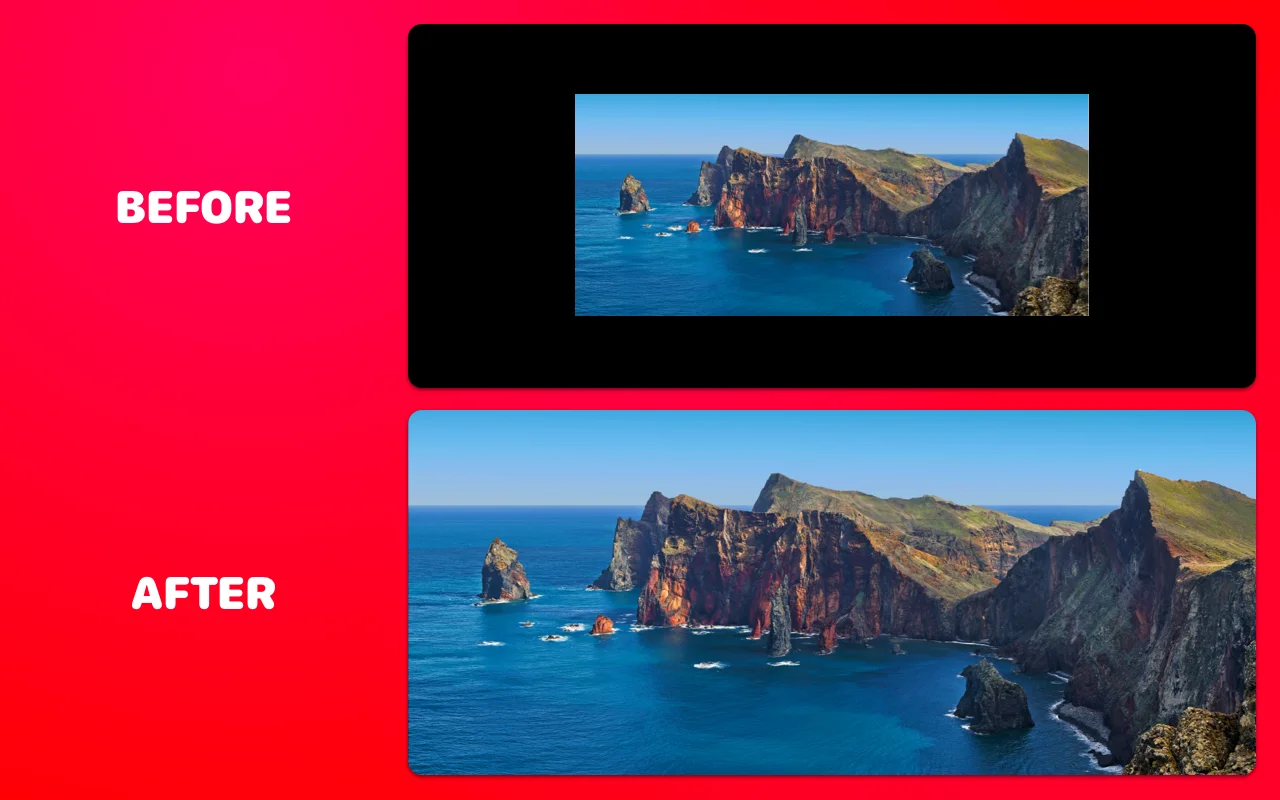
The trade-off: filling a 21:9 screen with true 16:9 content. A talking-head video or 16:9 TV show has picture all the way to its top and bottom edges. Zooming it to fill an ultrawide crops real content — roughly 25% from top and bottom. Fine for concerts, sports, gameplay footage where framing is loose; bad for anything with tight framing, captions or scoreboards near the edges.
Leave it alone: deliberate ratios. Some films shift aspect ratios by design (IMAX sequences opening up mid-scene), and some are intentionally narrow. Cropping those fights the filmmaker. Let art be art.
How to Remove Black Bars from Video on an Ultrawide
Displays can't do this themselves — your monitor just shows the 16:9 frame it's given. The fix is the UltraWide Video extension, free for Chrome and Edge:
- Install the extension and reload any open video tabs.
- Open your video — YouTube, Netflix, Disney+, Prime Video, Twitch, or any site with a video player.
- Choose a mode. Zoom scales the video proportionally until it fills your screen, cropping the overflow (the bars). Stretch widens the picture to fit without cropping, at the cost of slight distortion.
- Fine-tune if you like — pick an aspect preset (16:9, 18:9, 21:9, 24:9, 32:9), nudge the scale slider, or just tap Ctrl+↑ / Ctrl+↓ (⌘⇧↑ / ⌘⇧↓ on Mac) while watching.
- Go fullscreen. There's an "apply only in fullscreen" option so windowed video stays untouched.
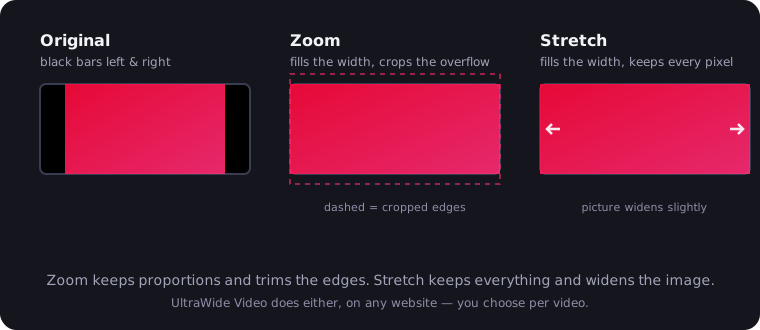
Which mode when? Zoom for letterboxed films — you're only cropping black. Stretch for 16:9 content where you'd rather accept a hint of widening than lose the edges. The full YouTube walkthrough covers both, plus troubleshooting; Netflix quirks get their own treatment in our Netflix ultrawide guide.
What about the TV's zoom button? Most TVs bury a "Zoom" or "Wide" mode in the picture settings, and it does crop letterbox bars — but it's a blunt instrument: fixed steps, no per-ratio presets, often disabled on streaming apps, and on a 16:9 TV zooming a scope film means genuinely amputating the sides of the picture. On a computer monitor there's no such button at all, which is exactly the gap the extension fills — precise, per-site, and pointed at a screen that's already movie-shaped.
So: Bars — Friend or Foe?
Both, honestly. On a 16:9 TV, letterboxing is your friend: it's the only way to see the whole widescreen frame, and "removing" it there means destroying picture. On a 21:9 ultrawide, baked-in bars are pure waste — your screen is already cinema-shaped, and the bars are just packaging that a one-click zoom strips away. Know which situation you're in, and the black bars stop being a mystery and become a choice.

Watching on an ultrawide monitor?
UltraWide Video removes black bars from YouTube, Netflix, Prime Video and any other site — zoom or stretch any video to fill your 21:9 or 32:9 screen.